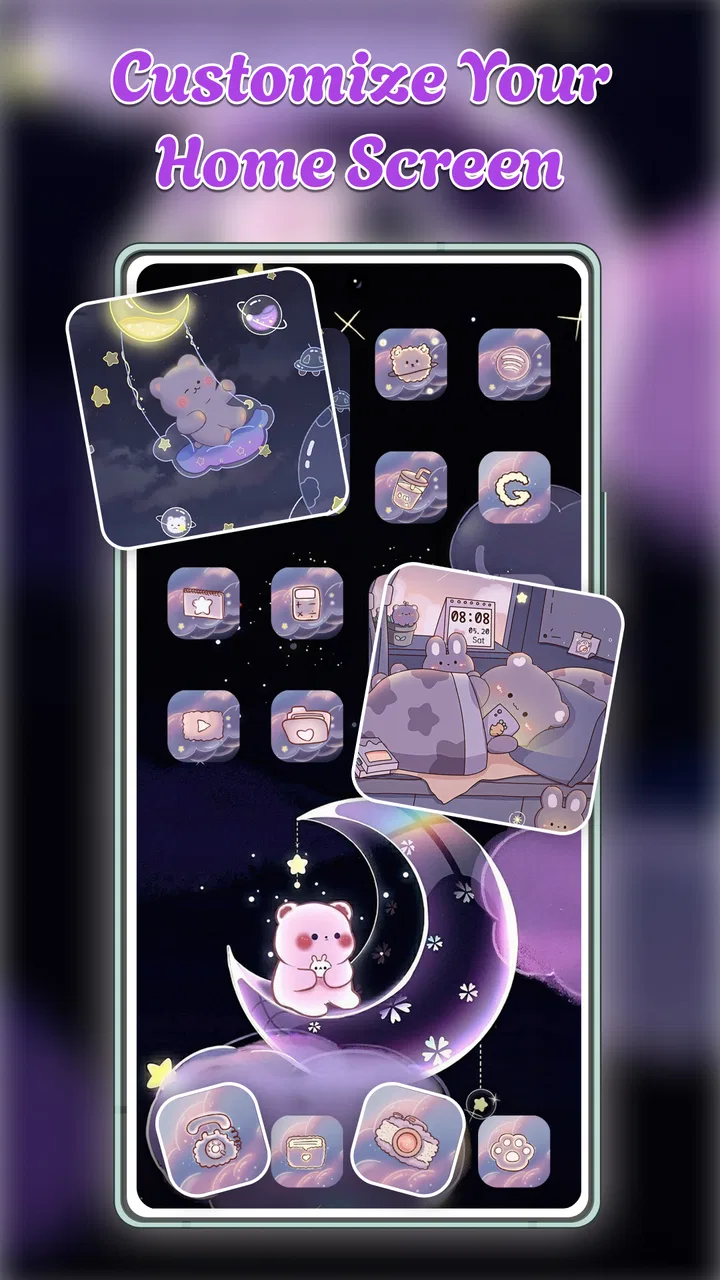
Themes Box: Icons & Widgets
- 4.3
- Rating
- 1.00M
- Installs
- Free
- Price
 Analysis by App-foxy
I installed Themes Box: Icons & Widgets to see whether it could make everyday phone customization easier than collecting separate icon packs, wallpaper apps, and keyboard tools. My first impression is that it is aimed at people who want a coordinated look without spending an afternoon matching every element manually. It sits in the personalization category, is free to install, and comes from EZProducts.
The appeal is straightforward: instead of treating the home screen, keyboard, and wallpaper as unrelated choices, the app brings those parts into one customization space. That makes it especially interesting if your phone feels visually inconsistent or if you regularly change styles with the seasons, your mood, or a new case. I found the idea more useful than a simple wallpaper picker because the visual result depends on how several parts of the phone work together.
How Themes Box feels in its current state
The app’s current version is 1.1.3, and it was released on September 15, 2025. Those details matter because this is still a relatively young customization product rather than a long-established utility with years of accumulated options. In my experience, the interface feels built around quick browsing: you look through visual choices, decide on a general direction, and then apply the pieces that suit your phone.
You May Also Like

 Blood Strike: 2.5 Anniversary
Blood Strike’s Loadouts Turn Every Drop Into a Tactical Gamble
A close look at Blood Strike’s custom loadouts: how fast access to signature weapons reshapes its battle royale rhythm, rewards preparation, and narrows the gap between fights.

 Pandora - Music & Podcasts
Pandora’s Music Is Easy to Start, but Harder to Recover
Pandora’s strength is its low-effort path from a seed to a station. Its weak spot is how much confidence it asks you to place in connection, setup, and quiet recovery.

 8 Ball Pool
 Is Built on Rivalries, Rematches, and Routine
A close look at the rivalries, rematches, shared routines, and unanswered safety questions that turn a quick pool match into a persistent mobile community.

 Samsung Music
’s Quiet Strength Is Playing What You Already Own
Its reach comes less from spectacle than from dependable access to a personal library. That simplicity is both the app’s strongest retention engine and its ceiling.

 AccuWeather: Weather Radar
AccuWeather Review: A Quick, Clear Forecast for Everyday Decisions
For everyday plans, the best forecast is the one you can understand quickly. AccuWeather makes rain timing, radar, and local conditions easy to act on, with a few trade-offs.

 Hill Climb Racing
Why Hill Climb Racing Still Turns Crashes Into One More Run
A tiny car, a bumpy hill and one more upgrade: Hill Climb Racing keeps resurfacing because its simple chaos makes every near-miss feel personal.
More From Our News Desk
View All News


That approach is convenient for casual users. I do not need to search separately for a background, an icon style, and a keyboard appearance before deciding whether they belong together. The main strength is not any single customization element; it is the reduced effort of getting a consistent appearance.
At the same time, I would not describe it as a complete replacement for every customization method. People who enjoy designing their own icons, arranging highly specific widgets, or fine-tuning every color may still prefer dedicated tools. Themes Box is more appealing when the goal is a polished change with limited setup rather than unlimited control.
The app supports devices running Android 8.0 or later. That gives it a fairly broad reach for Android users, including people who do not have a recent flagship phone. I would still check how your particular launcher handles icon changes before committing to a full redesign, because the final appearance can depend on the phone’s home-screen software as much as on the theme app itself.
Its free entry point makes experimentation easy. You can install it, browse the available direction, and decide whether the style fits before considering optional purchases. The listed in-app items range from $3.99 to $9.99 each, so the important question is not simply whether the app is free, but whether the included selection already covers your taste.
What the combined approach does well
I like the way the app encourages users to think in visual systems. A wallpaper that looks attractive on its own can make app labels hard to read, while a colorful icon set can clash with a busy background. Combining these choices in one place helps avoid that trial-and-error cycle.
A practical use case is a work phone that needs to remain easy to scan during a busy day. I would choose a calmer background, icons with clear silhouettes, and a keyboard style that does not make text entry visually tiring. For a personal phone, I might choose something more expressive. The same app can serve both situations because the decision is based on the look you want, not on a single fixed purpose.
Another useful scenario is preparing a phone for someone who is not comfortable with customization. Instead of explaining how to find separate downloads and adjust each part, I could guide that person through a more unified selection. That does not eliminate every Android-specific step, but it makes the creative decision less confusing.
The keyboard element is also worth considering separately. Many customization apps stop at wallpapers and icons, leaving the keyboard visually disconnected. Themes Box includes keyboards among its customization areas, which gives the overall result a better chance of feeling intentional. I would be careful, though, about choosing a keyboard only because it matches the wallpaper. Comfort, readability, and typing accuracy should come first.
Changes suggested by the current release
The move to version 1.1.3 suggests that EZProducts is actively refining the product rather than leaving an initial release untouched. I see that as encouraging for a new personalization app, but I would separate that observation from claims about future additions. A version number shows ongoing product work; it does not guarantee a particular feature or update schedule.
For existing users, the practical effect is that the app should be judged as a developing customization tool. If you already installed it, the sensible approach is to revisit the available themes after updates instead of assuming that your first browsing session represents the whole experience. Newer releases can change how smoothly you move between choices, even when the basic purpose remains the same.
I also recommend saving a mental note of your original home-screen arrangement before applying a major theme. This is not a criticism unique to Themes Box; any tool that changes several visual components can make it harder to remember what you had before. Take a screenshot of your layout, especially if you have carefully placed folders or widgets. That small step makes experimentation much less stressful.
There is a second workflow that worked better for me than changing everything immediately. I first selected a wallpaper, then checked whether the icons remained legible, and only afterward considered the keyboard. This order prevents the keyboard from becoming the deciding factor for the entire phone. It also makes it easier to identify which element is causing a visual problem.
Where the app may not be the best fit
The biggest limitation is the trade-off between convenience and precision. A bundled customization experience can help you reach a coherent look quickly, but it may not satisfy someone who wants to mix a particular icon pack with a completely unrelated widget design and a custom color palette. If your priority is fine-grained control, dedicated apps may offer a better route.
Launcher compatibility is another point to keep in mind. Android manufacturers handle home-screen customization differently, so applying icons may feel more direct on one phone than another. I would not treat a less-than-perfect result as proof that the visual concept is poor; it may reflect how your launcher accepts theme changes. Still, that distinction matters if you want a one-tap transformation.
The free model is helpful for trying the app, but optional purchases can influence how much of the catalog feels available. I would browse before buying and ask myself whether I can name a specific style I want. Paying for a theme makes more sense when it solves a clear need, such as creating a consistent look for a particular phone setup, than when I am simply scrolling because everything looks interesting.
Users who dislike changing their keyboard should also temper their expectations. A matching keyboard can complete a theme, but it is not essential to enjoying the icon and wallpaper side. I would keep the keyboard unchanged if the alternative reduces typing comfort or makes important keys less visible.
Privacy-conscious users should apply the same care they would use with any app that participates in personalization. I would review the permissions shown during installation and avoid granting access that does not seem relevant to the task. That is a sensible habit, particularly when an app reaches beyond static wallpapers into interactive phone elements.
Useful ways to decide whether it suits you
I think Themes Box is strongest for three kinds of people. First, it suits someone who wants a fast visual refresh without designing every component. Second, it works for users who enjoy changing styles but dislike hunting through several unrelated apps. Third, it can help anyone who wants the home screen, icons, wallpaper, and keyboard to feel like parts of the same idea.
I would be more cautious if you already have a carefully built setup based on custom launchers, individually selected widgets, and manually edited icons. In that case, the app may be more useful as a source of inspiration than as a complete replacement. You may appreciate its coordinated themes while still keeping your existing tools for the final arrangement.
For a family member with an older Android phone, the minimum operating-system requirement is worth checking before recommending it. Android 8.0 compatibility is broad, but it is not universal. If the phone meets that requirement, the free installation makes a trial relatively low-risk, provided the person is comfortable changing the home screen.
One non-obvious advantage is that a coordinated theme can reduce decision fatigue. Instead of repeatedly asking whether a new wallpaper matches your icons, you begin with a visual direction and make fewer isolated choices. That is useful for people who want personalization to feel relaxing rather than like a design project.
A less obvious drawback is that a unified look can make a phone feel less personal if you apply it without editing the result. I prefer using a theme as a starting point, then keeping the folders, widgets, and shortcuts that reflect how I actually use the phone. The best outcome is not a showroom-style home screen; it is one that looks good while remaining quick to navigate.
How it compares with familiar alternatives
The usual alternative is to use separate apps: one for wallpapers, another for icons, perhaps a launcher for layout control, and a keyboard app for typing themes. That route can provide more choice and more control, but it also creates more work. You need to compare visual styles yourself, remember which app controls which element, and troubleshoot each part separately.
Themes Box has the advantage when coordination matters more than maximum variety. It is the option I would suggest to a friend who says, “I want my phone to look different, but I do not want to become a home-screen designer.” A dedicated icon or launcher tool is better for someone who already knows exactly what they want and is willing to assemble it piece by piece.
There is also a middle path. You can use Themes Box to find a general direction, then keep only the components that work well with your current setup. For example, the wallpaper may be the strongest part of a style, while your existing launcher arrangement remains more practical. This selective approach avoids the all-or-nothing feeling that often makes people abandon customization after one unsuccessful attempt.
What current users should watch next
Because the app is at version 1.1.3 and has a release date in 2025, I would watch how consistently EZProducts improves the browsing and applying process. For me, future progress would be most valuable if it made theme changes easier to preview, clearer to undo, and more predictable across different Android launchers.
I would also watch whether the catalog continues to feel balanced between quick decorative choices and genuinely usable designs. A theme can look impressive in a preview while being inconvenient once labels, folders, and everyday typing enter the picture. Readability and navigation should remain as important as visual variety.
The app has an average rating of 4.3 from around 3.5 thousand ratings, with over one million installs, so it has already attracted a substantial audience for a recent personalization product. I treat that as a useful sign of interest rather than a guarantee that every phone will behave identically. The experience still depends on your device, launcher, and tolerance for changing established habits.
It is rated for Everyone, which fits its general purpose as a visual customization tool. Even so, I would explain the changes before setting it up for another person, especially someone who relies on a familiar keyboard or home-screen arrangement. “Easy to customize” does not always mean “impossible to make confusing.”
My recommendation after using it
Themes Box: Icons & Widgets is a sensible choice if you want a coordinated phone makeover without assembling every piece from separate sources. I enjoyed the way it connects icons, wallpapers, keyboards, and other visual elements into one personalization workflow. The free starting point makes it easy to explore, while the optional purchases mean I would browse carefully before spending.
My recommendation comes with a clear condition: use it as a flexible starting point, not as a promise that every Android phone will transform identically. Save your current layout, test readability, and change one element at a time when you are unsure. Those habits make the app more useful and reduce the frustration that can come from applying a full visual change too quickly.
I would recommend it to casual customizers, people refreshing an older-looking home screen, and anyone who wants the keyboard and wallpaper to belong to the same visual world. I would point advanced launcher users toward a more specialized setup if they need exact control over every icon, widget, and spacing choice. For everyone in between, this app offers a convenient balance: enough variety to make a phone feel new, with less manual work than the traditional collection of separate customization tools.
FAQs for Themes Box: Icons & Widgets
01What is Themes Box: Icons & Widgets?
Themes Box: Icons & Widgets is an app designed to personalize your smartphone's appearance. It offers a wide variety of themes, icons, and widgets to customize your home screen. Users can easily apply different styles to give their device a fresh and unique look, enhancing the aesthetic experience.
02Is Themes Box: Icons & Widgets free to use?
Themes Box offers a free version with basic features and customization options. However, to access premium themes, icons, and widgets, users may need to purchase a subscription or make in-app purchases. This allows for a more extensive selection of designs and exclusive content.
03How user-friendly is Themes Box: Icons & Widgets?
The app is designed with a user-friendly interface, making it easy for users to navigate through the various customization options. Even those who are not tech-savvy can quickly apply themes and widgets. The app provides a seamless experience with straightforward instructions and previews.
04Does Themes Box affect my phone’s performance?
While Themes Box is designed to optimize performance, applying numerous widgets and high-resolution themes may impact your device’s speed and battery life. It’s recommended to balance the use of features to ensure smooth operation. Regular updates help enhance compatibility and performance.
05What devices are compatible with Themes Box: Icons & Widgets?
Themes Box is available for both Android and iOS devices. It supports a wide range of smartphones and tablets, though some older models might have limited compatibility with the latest features. It’s important to check device requirements in the app store before downloading.
Pros
- Extensive icon library for customization.
- Regular updates with new themes.
- Easy-to-use interface.
- Widgets enhance home screen functionality.
- Low impact on device performance.
Cons
- Limited free options available.
- Some icons require separate downloads.
- Occasional minor bugs.
- Ads in the free version.
- No offline mode for updates.

Themes Box: Icons & Widgets
Gallery